
Skip to content

Grade 10 · Core Mathematics · Lesson 9 of 13

Comparing Table and Calculator Logarithms

A Grade 10 Core Mathematics CBE lesson from the sub-strand Indices and Logarithms. In it, learners use a calculator log key safely.

Strand Numbers and AlgebraSub-strand Indices and LogarithmsLesson code 10CM-12-L940 minutes · 4 slides

KICD learning outcome (e)

Determine common logarithms of numbers from mathematical tables and calculators.

By the end of this lesson, learners should be able to

  1. Use a calculator log key safely.
  2. Compare calculator output with a table reading.
  3. Select and report suitable precision for context.
  4. Find antilogarithms using tables and a calculator.

Key vocabulary

Log key
A calculator button that computes a logarithm value.
Pressing log for 48 returns its common logarithm.
Display
The value shown on the calculator screen.
The display may show more decimal places than required.
Approximation
A value close to an exact or measured value.
A calculator approximation may be rounded to four decimals.
Agreement
A close match between independently obtained results.
Agreement to four places supports a careful table lookup.
Rounding
Reducing digits while retaining an appropriately close value.
Rounding 2.43176 to four decimals gives 2.4318.
Valid argument
A positive input allowed inside a real common logarithm.
The number 6.2 is a valid common-log argument.

Lesson preview

Slide 1 · Calculator procedure with a reasonOpening · 10 min
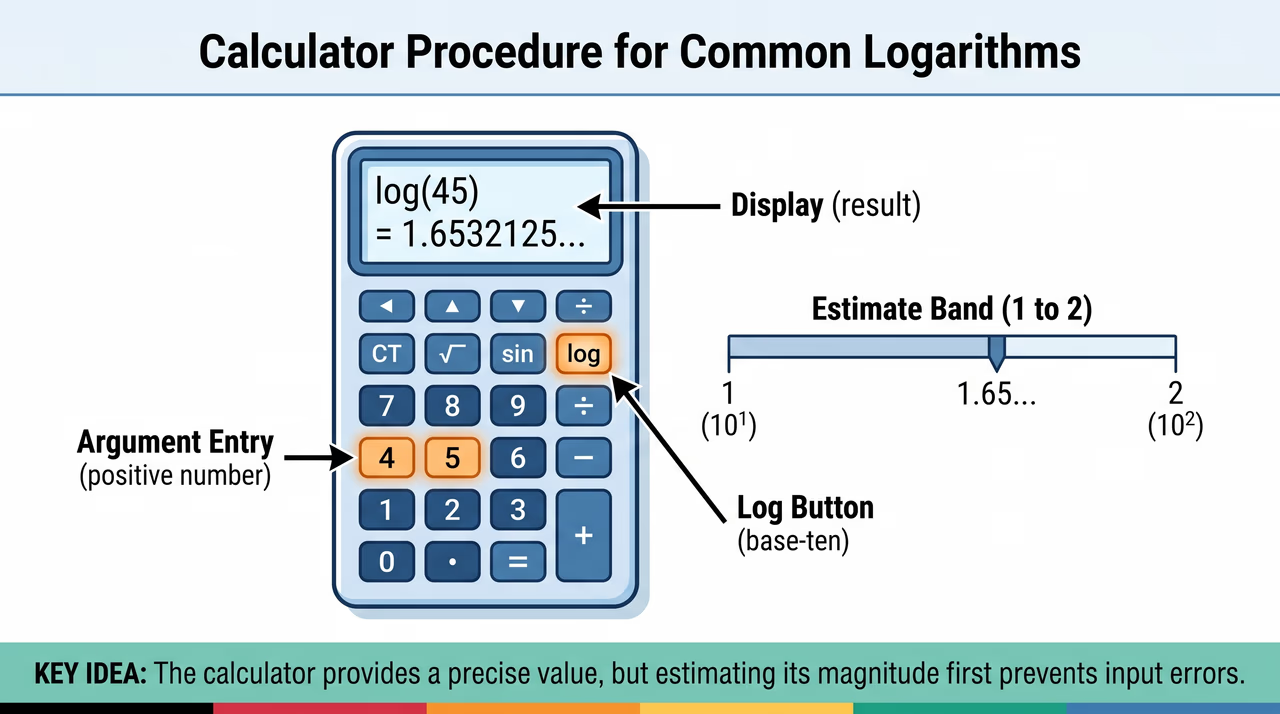
A calculator displays the common logarithm of forty-five alongside a number line that confirms the result falls between one and two.
Figure 1: A calculator displays the common logarithm of forty-five alongside a number line that confirms the result falls between one and two.

A calculator finds a common logarithm directly, but the displayed value still needs interpretation. Enter the positive number carefully, select the base-ten log function, record the display, and check its magnitude using nearby powers of ten. See Figure 1 for an example of entering a number and verifying the output magnitude.

  • Only positive arguments are valid for real common logarithms.
  • Use the base-ten log key, not natural log.
  • Record enough displayed digits for the task.
  • Estimate the logarithm first to catch input mistakes.
Worked example. Estimate the result should lie between 1 and 2. Enter 48 and select the base-ten log function. Record the display and compare it with the estimate. Answer: Use the log key on 48; the result is approximately 1.6812..

Check question: A learner attempts to evaluate log⁡10(0) on a standard scientific calculator. What is the correct mathematical reason this will result in an error?

  1. Zero is not a valid positive argument, so its common logarithm is undefined.
  2. The common logarithm of zero equals 1, which does not require a calculator.
  3. The calculator must be set to natural logarithms to evaluate zero.
  4. Zero is too small, so a logarithm table must be used instead.
Show answer

Zero is not a valid positive argument, so its common logarithm is undefined. The common logarithm of zero is undefined because there is no power to which you can raise 10 to get 0. Only positive numbers are valid arguments for real logarithms.

Slide 2 · Compare two valid methodsModel · 10 min
A side-by-side comparison shows how a logarithm table and a scientific calculator yield the same result for six point two four when rounded.
Figure 2: A side-by-side comparison shows how a logarithm table and a scientific calculator yield the same result for six point two four when rounded.

Teach the full lesson on the projector

This lesson, and every other Grade 1–10 CBE lesson, comes ready to project with the EAP ClassKit. It runs without electricity or internet.

  • All 4 slides with diagrams and class activities
  • Teacher notes, SNE adaptations and assessment checks
  • Homework and the other 12 lessons in this sub-strand

All 13 lessons in Indices and Logarithms

  1. 1Reading Repeated Factors as IndicesExpress numbers in index form
  2. 2Index Forms with a Specified BaseExpress numbers in index form
  3. 3Discovering Product and Quotient LawsDerive the laws of indices using factors
  4. 4Power of a Power and Identity CasesDerive the laws of indices using factors
  5. 5Indices in Measurement and DesignApply the laws of indices in different situations
  6. 6From Powers of Ten to Common LogsRelate index notation to logarithm notation to base 10
  7. 7Interpreting Base-Ten LogarithmsRelate index notation to logarithm notation to base 10
  8. 8Reading Common Logarithms in TablesDetermine common logarithms of numbers from mathematical tables and calculators
  9. 9Comparing Table and Calculator LogarithmsDetermine common logarithms of numbers from mathematical tables and calculators
  10. 10Logarithms for Multiplication and DivisionApply common logarithms in multiplication, division, powers and roots of numbers
  11. 11Logarithms for Powers and RootsApply common logarithms in multiplication, division, powers and roots of numbers
  12. 12Integrated Logarithmic ComputationApply common logarithms in multiplication, division, powers and roots of numbers
  13. 13Why Indices and Logarithms MatterAppreciate the use of indices and common logarithms in mathematical computations