Skip to content

Grade 10 · Core Mathematics · Lesson 12 of 16

Interpreting Data from Histograms and Frequency Polygons

A Grade 10 Core Mathematics CBE lesson from the sub-strand Statistics I. In it, learners identify modal classes and extract frequency totals from histograms.

Strand Statistics and ProbabilitySub-strand Statistics ILesson code 10CM-31-L1240 minutes · 3 slides

KICD learning outcome (e)

Interpret data from histograms and frequency polygons.

By the end of this lesson, learners should be able to

  1. Identify modal classes and extract frequency totals from histograms.
  2. Calculate grouped mean values from histograms by constructing frequency tables.
  3. Interpret frequency polygons to calculate total quantities and averages.

Key vocabulary

Histogram
A graphical display of continuous data using touching vertical bars showing frequencies.
This histogram represents test scores of fifty learners across four equal score intervals.
Modal class
The class interval containing the highest frequency in a grouped dataset.
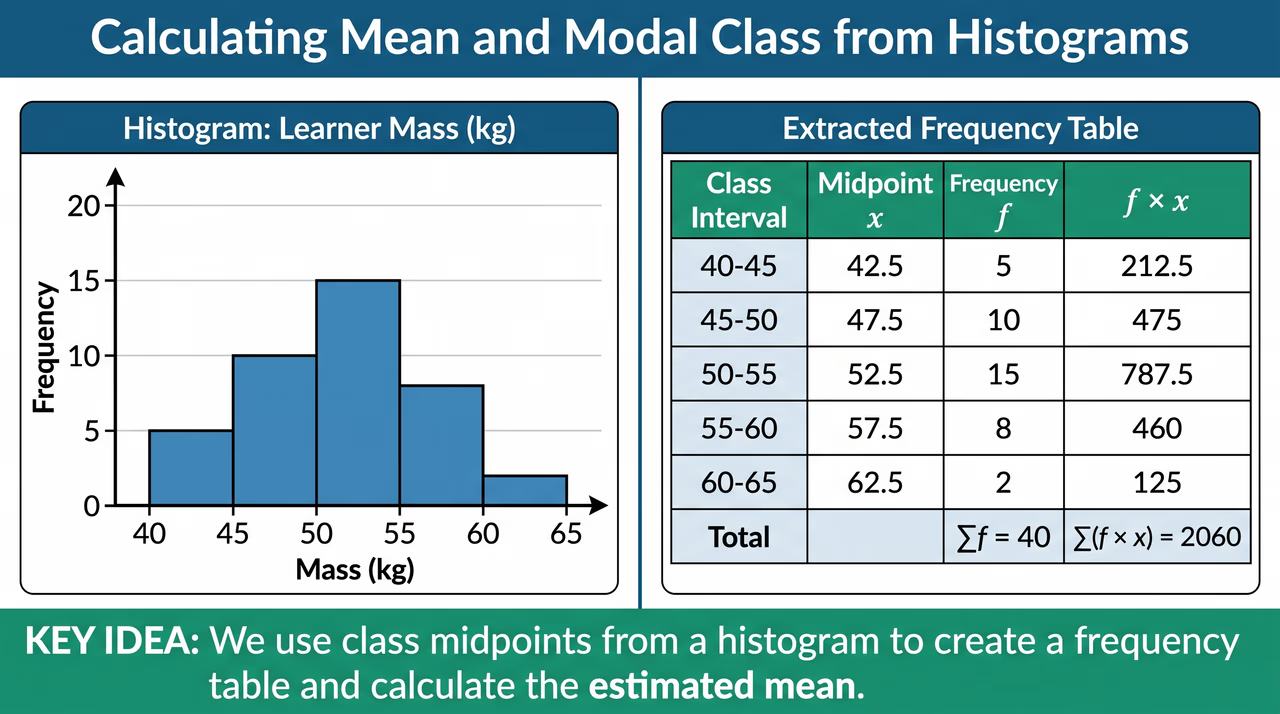
The modal class for learner masses is fifty to fifty-four kilograms with fifteen learners.
Frequency polygon
A line graph drawn by connecting class midpoints and frequencies with straight line segments.
The frequency polygon shows milk collection peaking at thirty litres with sixteen suppliers.

Lesson preview

Slide 1 · Interpreting Data from HistogramsOpening · 12 min
A histogram displaying test scores across class boundaries, with an arrow pointing to the tallest bar to indicate the modal class.
Figure 1: A histogram displaying test scores across class boundaries, with an arrow pointing to the tallest bar to indicate the modal class.

A histogram allows us to extract vital statistical information from grouped data. Since the bars are adjacent with no gaps between boundary lines, each bar's width represents a class interval, and its height represents frequency. By examining the height of the tallest bar, we immediately identify the modal class. Furthermore, by summing frequencies across specific intervals, we can determine total participants or the number of learners achieving specific cut-off scores.

  • Histograms represent continuous quantitative data using vertical rectangular bars that touch each other without gaps.
  • The horizontal axis displays continuous class boundaries while the vertical axis shows frequency values.
  • The class interval with the tallest bar identifies the modal class of the distribution.
  • Adding frequencies of bars beyond a boundary gives the total number above that threshold mark.
Worked example. 1. Total candidates = 12 + 18 + 10 + 5 = 45. 2. The tallest bar has height 18, corresponding to the class boundary interval 30.5–40.5. 3. Candidates scoring above 40.5 (which covers pass mark 41) are in intervals 40.5–50.5 and 50.5–60.5: 10 + 5 = 15 learners. Answer: (a) 45 learners, (b) 30.5–40.5, (c) 15 learners.

Check question: A histogram displays test marks with intervals 10.5–20.5 (f=5), 20.5–30.5 (f=12), 30.5–40.5 (f=15), and 40.5–50.5 (f=8). How many learners scored above 30.5 marks?

  1. 15 learners
  2. 23 learners
  3. 35 learners
  4. 40 learners
Show answer

23 learners. Learners scoring above 30.5 marks are in the 30.5–40.5 interval (15 learners) and the 40.5–50.5 interval (8 learners). Summing these gives 15+8=23 learners.

Slide 2 · Calculating Mean and Modal Class from HistogramsModel · 14 min
A histogram of learner masses next to a frequency table showing the class intervals, midpoints, frequencies, and their calculated products.
Figure 2: A histogram of learner masses next to a frequency table showing the class intervals, midpoints, frequencies, and their calculated products.

Teach the full lesson on the projector

This lesson, and every other Grade 1–10 CBE lesson, comes ready to project with the EAP ClassKit. It runs without electricity or internet.

  • All 3 slides with diagrams and class activities
  • Teacher notes, SNE adaptations and assessment checks
  • Homework and the other 15 lessons in this sub-strand

All 16 lessons in Statistics I

  1. 1Gathering Data from Practical SituationsCollect data from real-life sources
  2. 2Frequency Distribution Tables for Ungrouped and Grouped DataDraw a frequency distribution table for grouped and ungrouped data
  3. 3Drawing Grouped Frequency Distribution TablesDraw a frequency distribution table for grouped and ungrouped data
  4. 4Constructing Frequency Distribution Tables for Grouped and Ungrouped DataDraw a frequency distribution table for grouped and ungrouped data
  5. 5Calculating Averages and Middle Values of Raw DataDetermine mean, mode and median of grouped and ungrouped data
  6. 6Determining Median of Data and Introduction to Grouped Data MeanDetermine mean, mode and median of grouped and ungrouped data
  7. 7Determining Mean, Modal Class, and Median of Grouped DataDetermine mean, mode and median of grouped and ungrouped data
  8. 8Determining Mean, Mode, and Median of Grouped and Ungrouped DataDetermine mean, mode and median of grouped and ungrouped data
  9. 9Representing Data Using Histograms and Frequency PolygonsRepresent data using histograms and frequency polygons
  10. 10Constructing Histograms and Frequency PolygonsRepresent data using histograms and frequency polygons
  11. 11Advanced Data Representation: Histograms and Frequency PolygonsRepresent data using histograms and frequency polygons
  12. 12Interpreting Data from Histograms and Frequency PolygonsInterpret data from histograms and frequency polygons
  13. 13Interpreting Histograms and Frequency PolygonsInterpret data from histograms and frequency polygons
  14. 14Interpreting Histograms and Frequency PolygonsInterpret data from histograms and frequency polygons
  15. 15Data Collection, Organisation, and Informed Decision MakingPromote data collection, organisation and representation for informed decision making
  16. 16Data Interpretation and Decision MakingPromote data collection, organisation and representation for informed decision making